Lighthouse Scores for Shopify websites
This is a short version to accommodate your limited attention span.
Full version here.
Introduction
What are Lighthouse Performance Score
Lighthouse is the most popular tool to analyze the performance of a website.
The most important metric is Performance. It ensures that your page is optimized for users to be able to see and interact with page content.
The performance score is a weighted average of the current metrics:
- 10% First Content Paint (FCP): how long it takes the browser to render the first piece of DOM content.
- 10% Speed Index: how quickly content is visually displayed during page-load.
- 30% Total Blocking Time (TBT): the total amount of time that a page is blocked from responding to user input.
- 25% Largest Contentful Paint (LCP): when the largest content element in the viewport is rendered to the screen.
- 25% Cumulative Layout Shift (CLS): the largest burst of layout shift scores for every unexpected layout shift that occurs during the entire lifespan of a page.
Measuring the performance
Measuring a website’s performance with Lighthouse is like measuring a person’s height with an octopus. You will never get the same result twice, and it can leave you quite tangled up…
We will use different tools, and we will try to understand the difference between the results:
- Page Speed Insights
- The Chrome User Experience Report (CrUX)
- Lighthouse (Browser)
Lighthouse and Shopify
If you have a Shopify store or if you’re a theme developer, you will be familiar with the Shopify speed score. The Shopify speed score is the Lighthouse performance score calculated on the Shopify test environment.
Your score is based on a weighted average of the Lighthouse performance scores for a store’s home page, product page with the most traffic over the last 7 days, and a collection page with the most traffic. Weights are based on multiple factors, including the relative traffic to each of these page types across all Shopify stores.
In pursuit of the perfect picture
To experiment with Lighthouse, let’s engage in a simple task: building the perfect image snippet using Shopify Liquid.
The experiment
We have built a simple page, here’s a recording of it:
Snippet 1:
The first snippet is simple, no Javascrpit, and it uses tailwind:
{% liquid
assign image_class = 'aspect-auto h-full w-full rounded-md object-cover ' | append: class
assign alt = alt | default: image.alt | escape

    assign preload = false
    assign priority = 'auto'
    assign decoding = 'auto'

    if lazyload or lazyload == null
        assign lazyload = 'lazy'
        assign decoding = 'async'
    elsif lazyload == false
        assign lazyload = 'eager'
        assign priority = 'high'
        assign preload = true
    endif

%}

{{
image | image_url: width: image.width
| image_tag:
alt: image_alt,
class: image_class,
widths: '200,300,400,500,600,700,800,1000,1200,1400,1600,1800,2000,2200',
loading: lazyload,
fetchpriority: priority,
decoding: decoding,
preload: preload
}}
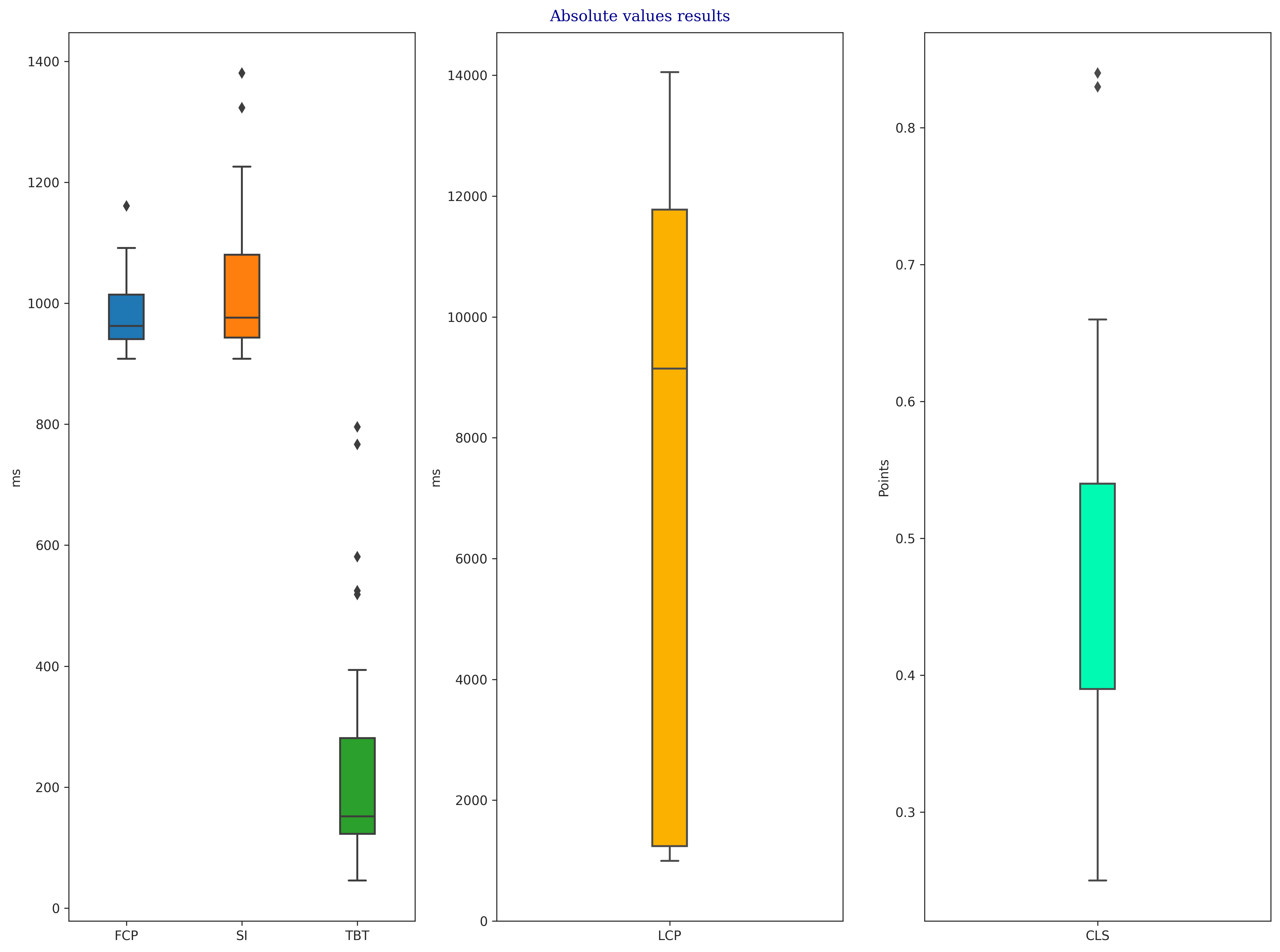
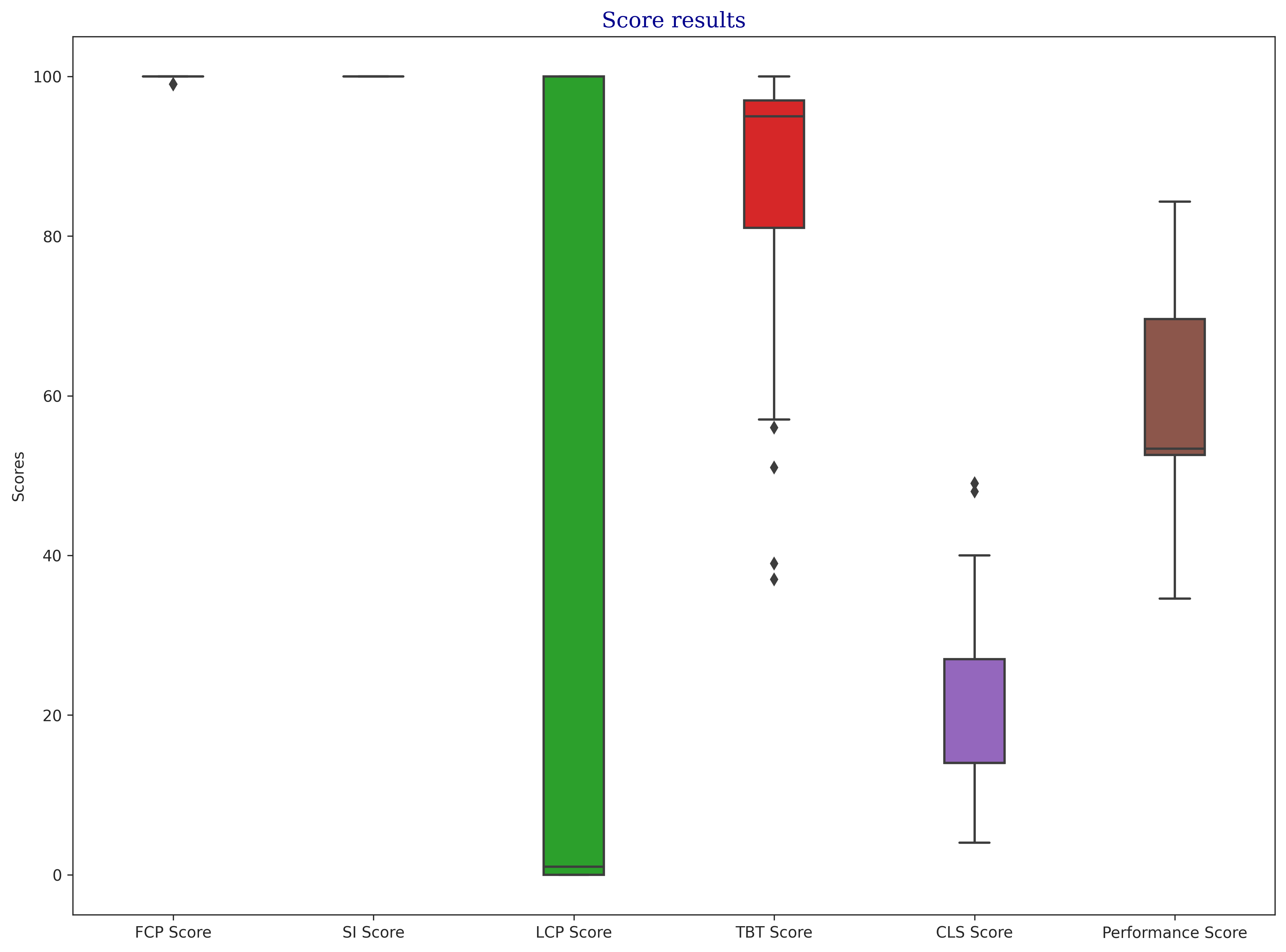
Snippet 1 Results
Snippet 2
The second snippet uses Javascript and CSS.
<div class="ratio" style="--ratio: calc({{ image.width }} / {{ image.height }})">
    <picture>
        <source
                srcset="{{ image | image_url: width: 300 }}"
                media="(max-width: 343px)">
        <source
                srcset="{{ image | image_url: width: 420 }}"
                media="(min-width: 344px) and (max-width: 576px)">
        <source
                srcset="{{ image | image_url: width: 540 }}"
                media="(min-width: 1024px) and (max-width: 1399px)">
        <source
                srcset="{{ image | image_url: width: image.width }}"
                media="(min-width: 1400px)">
        <img
                src="{{ image | image_url: width: 600 }}"
                alt="{{ image.alt }}"
                loading="lazy"
                class="lazy"
                height="{{ image.height }}px"
                width="{{ image.width }}px">
    </picture>
</div>
import lazySizes from 'lazysizes';
import 'lazysizes/plugins/attrchange/ls.attrchange';
import 'lazysizes/plugins/respimg/ls.respimg';
import 'lazysizes/plugins/native-loading/ls.native-loading';
lazySizes.cfg.lazyClass = 'lazy';
lazySizes.cfg.init = false;
lazySizes.cfg.preloadAfterLoad = false;
lazySizes.cfg.loadMode = 1;
lazySizes.cfg.nativeLoading = {
setLoadingAttribute: true,
disableListeners: {
focus: false,
mouseover: false,
click: false,
load: false,
transitionend: false,
animationend: false,
scroll: true,
resize: true
}
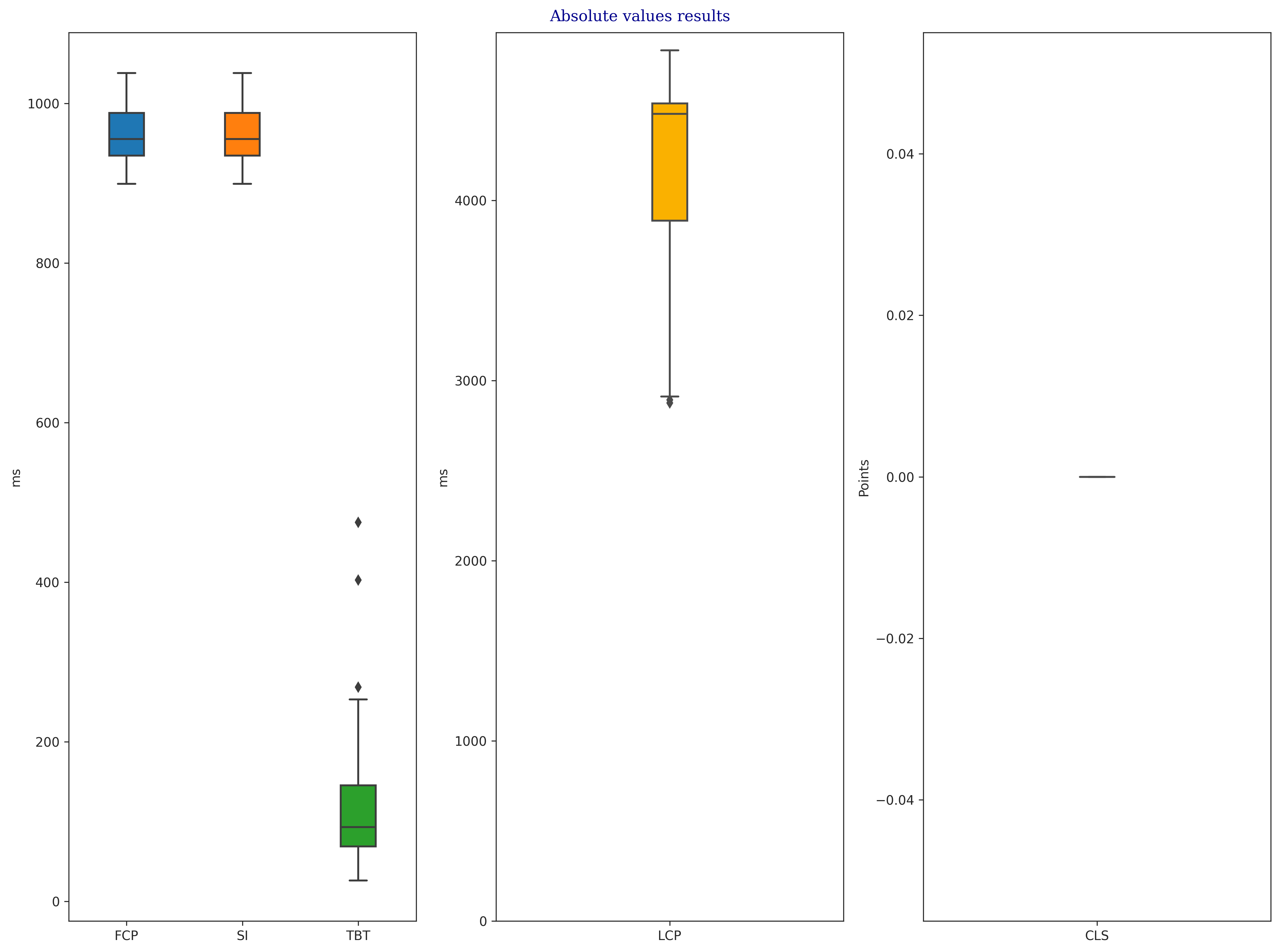
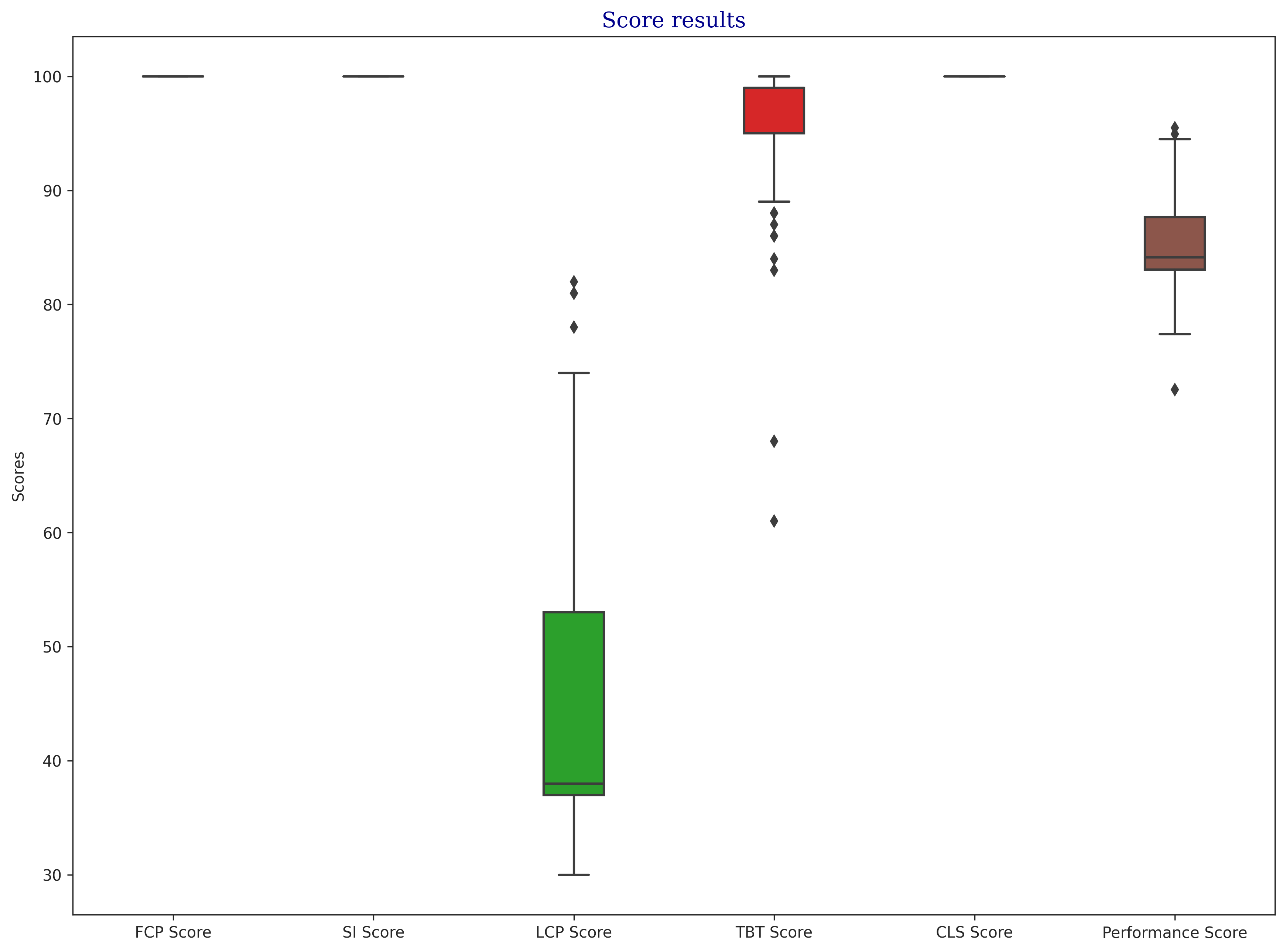
};Snippet 2 Results
Comparing Results
| Score | Snippet 1 | Snippet 2 |
|---|---|---|
| FCP Score | 99.90±0.30 | 100.00±0.00 |
| SI Score | 100.00±0.00 | 100.00±0.00 |
| LCP Score | 32.35±44.52 | 44.20±11.78 |
| TBT Score | 88.07±12.87 | 95.90±6.19 |
| CLS Score | 19.94±9.87 | 100.00±0.00 |
| Performance Score | 59.48±10.49 | 84.82±3.60 |
Snippet 2 is the clear winner!
First Content Paint and Speed Index were almost always perfect because they depend on the server speed, and both pages were served by Shopify, which has proved to be fast.
Total Blocking Time is comparable, but even in that case, Snippet 2 is ahead.
Cumulative Layout Shift is very different. Snippet 2 is perfect, while Snippet 1 is struggling.
The difference in Largest Contentful Paint makes us emphasize that even a significant variance is a bad signal. This is because users may have a different experience on the same page, or the page can behave very differently under certain circumstances.